
Every Work Order Has a Status. Every Blocker Has an Owner.
In most DME operations, work orders live in spreadsheets, sticky notes, and the dispatcher's memory. Nobody knows which orders are ready to route, which are blocked, or why. CareLogix gives every work order a clear status, a readiness score, and a visible blocker, from the moment a referral arrives through the moment billing is submitted.
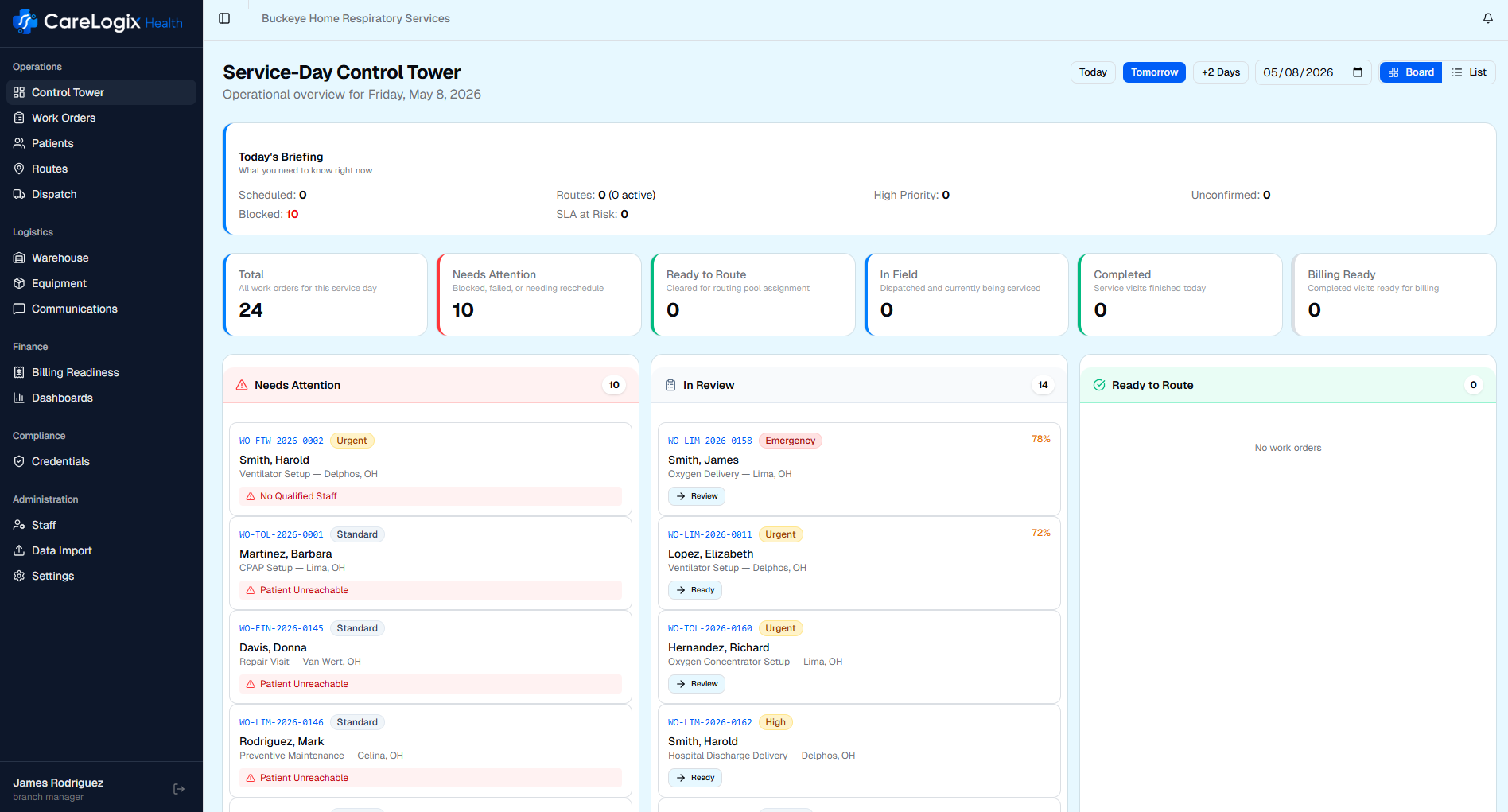
When Work Orders Live in Spreadsheets, Nobody Sees the Full Picture
A DME provider processing 200 work orders per week has, at any given moment, orders in a dozen different states: waiting for prior auth, waiting for equipment, waiting for patient confirmation, ready to route, routed but not dispatched, dispatched but not completed, completed but not billable. Each state has different owners, different timelines, and different risks.
In most operations, this information is scattered. Intake tracks their queue in one spreadsheet. The warehouse tracks equipment availability in another. The dispatcher holds route readiness in their head. Billing finds out what is missing weeks after the visit. And the branch manager has no single view of the operation.
The consequences are predictable: blocked work orders are discovered when a dispatcher tries to route them. Equipment that should have been ordered three days ago sits unrequested. A patient who was never confirmed gets a tech on their doorstep. Work that was completed cannot be billed because nobody told the tech to collect a signature.
This is not a technology problem; it is an orchestration problem. No single system owns the work order lifecycle, so nobody can see it. CareLogix changes that.
How It Works
- 1
Order Received
Work orders enter the system from AI fax intake, manual entry, or API import. Each order is created with a complete data profile: patient, equipment, visit type, payer, physician, and authorization status.
- 2
Readiness Checked
The system automatically evaluates every order against readiness criteria: Is the prior auth approved? Is the equipment in stock? Is the patient confirmed? Each factor contributes to a readiness score.
- 3
Blockers Identified
Any factor preventing an order from being routed is surfaced as a named blocker with an assigned owner and a target resolution date. Blockers are visible to everyone who needs to see them.
- 4
Ready Work Enters Routing Pool
Orders that meet all readiness criteria are automatically available for AI route planning. Blocked orders remain visible in the pipeline but do not consume route capacity or create false availability.
- 5
Full Lifecycle Tracked
Every status change, every action, every owner is logged with a complete audit trail. From referral received through billing-ready, the entire lifecycle is visible in one view.
Key Capabilities
ROI Impact
Complete lifecycle visibility from referral to billing
Connected Workflow
This module works hand-in-hand with the rest of CareLogix.
AI Fax Intake
Faxed referrals are converted to structured work orders by AI and enter the pipeline automatically with all extracted data pre-filled.
Learn moreRoute Planning
Ready work orders flow into the AI routing pool. Blocked orders stay visible but do not clutter the routing queue.
Learn moreBilling Readiness
Completed work orders are evaluated for billing completeness the same day. The work order status updates to billing-ready when all requirements are met.
Learn moreStop Guessing. Start Seeing Your Entire Operation.
See how CareLogix transforms your operation in a 30-minute walkthrough.